
Claude Code Architecture (Reverse Engineered)
Inside The Architecture of an Autonomous Agent

We are entering the third era of LLM applications. We started with Chatbots (stateless Q&A), moved to Workflows (rigid, code-driven chains like n8n or LangChain), and are now arriving at Autonomous Agents (model-driven loops). Claude Code is the first mass-market example of this new architecture. I call these “Superagents”
TL;DR — The 6 Architectural Shifts
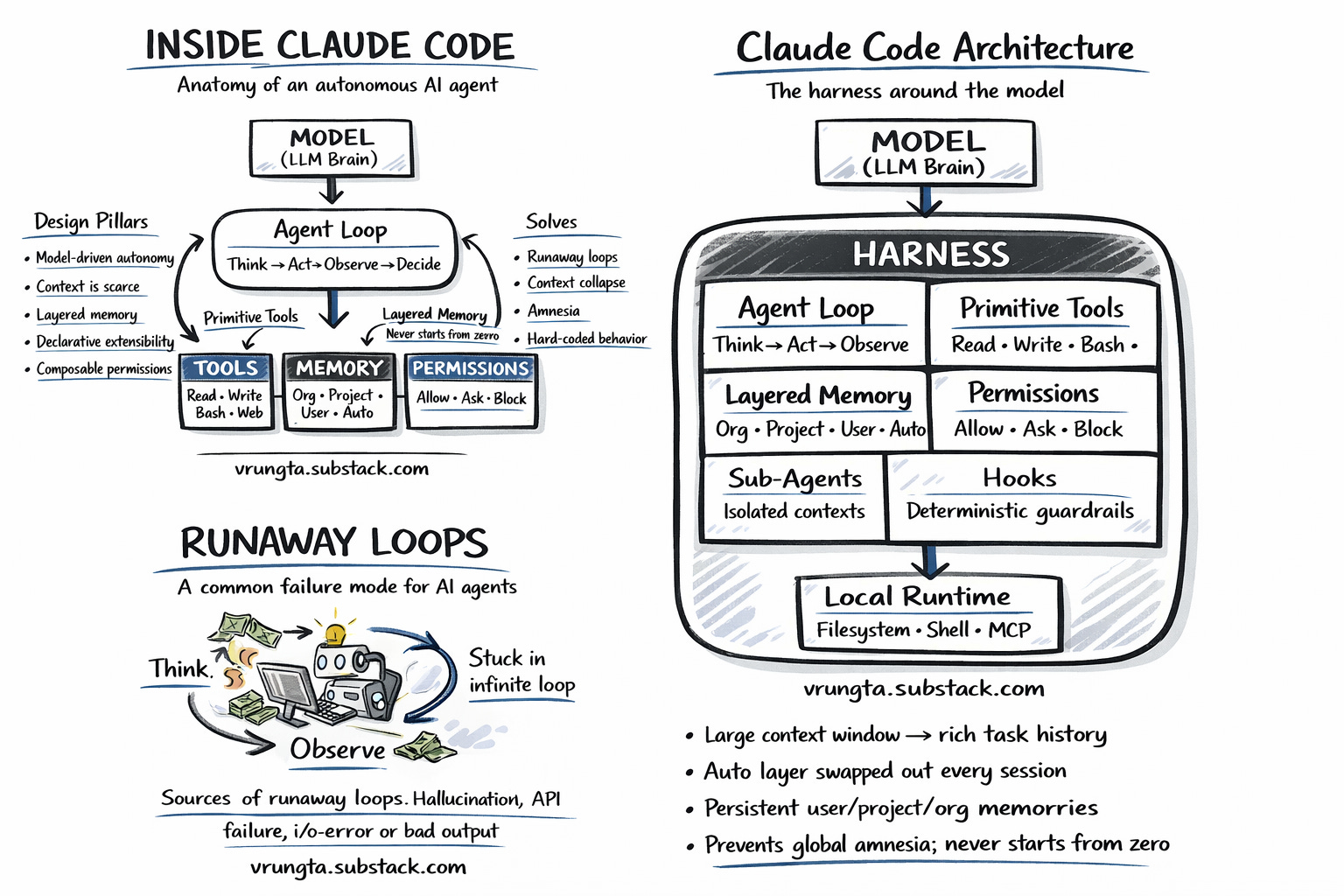
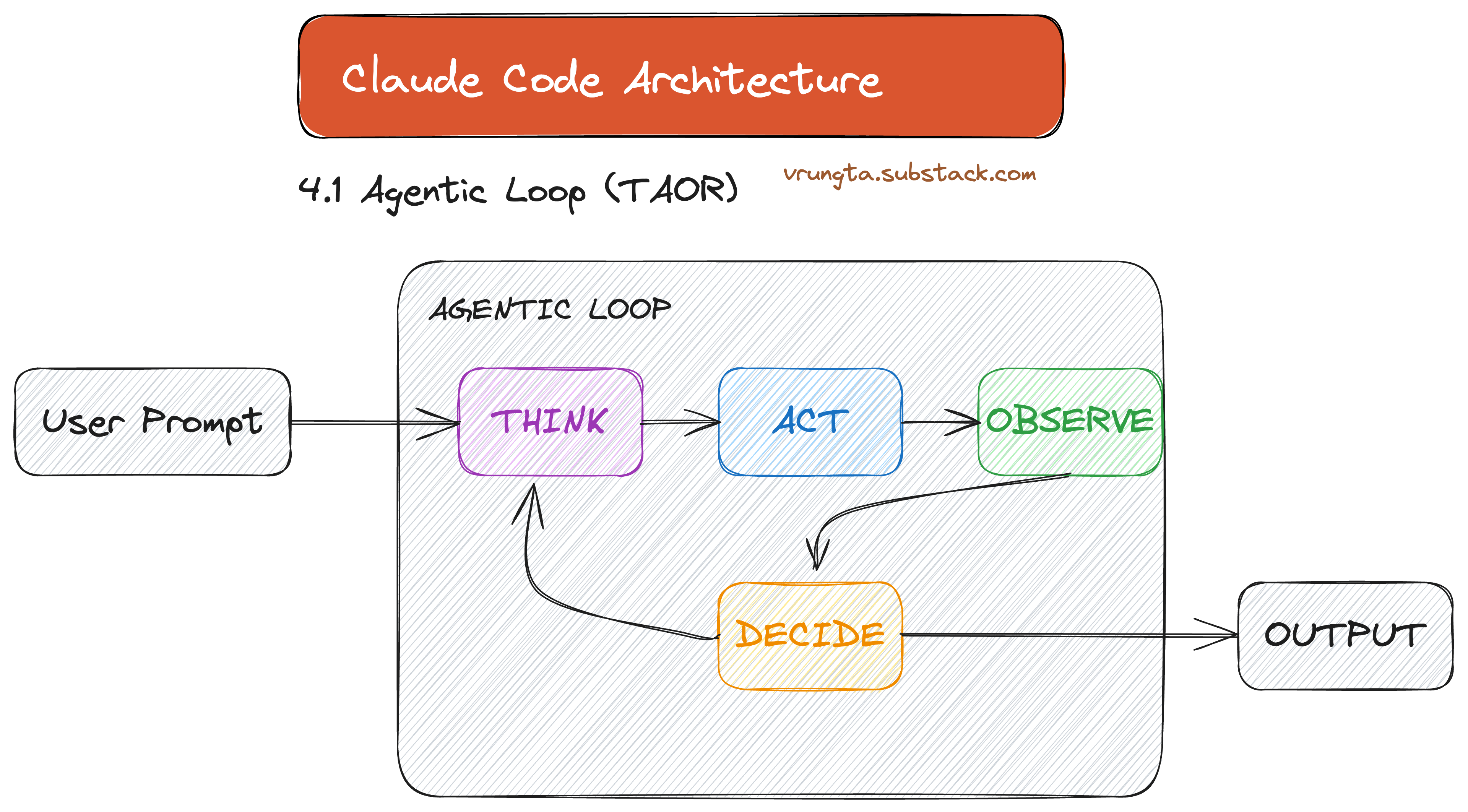
From Workflows to Loops: Moving from “Code controls the Model” (DAGs) to “Model controls the Loop” (TAOR). The runtime is dumb; the model is the CEO.
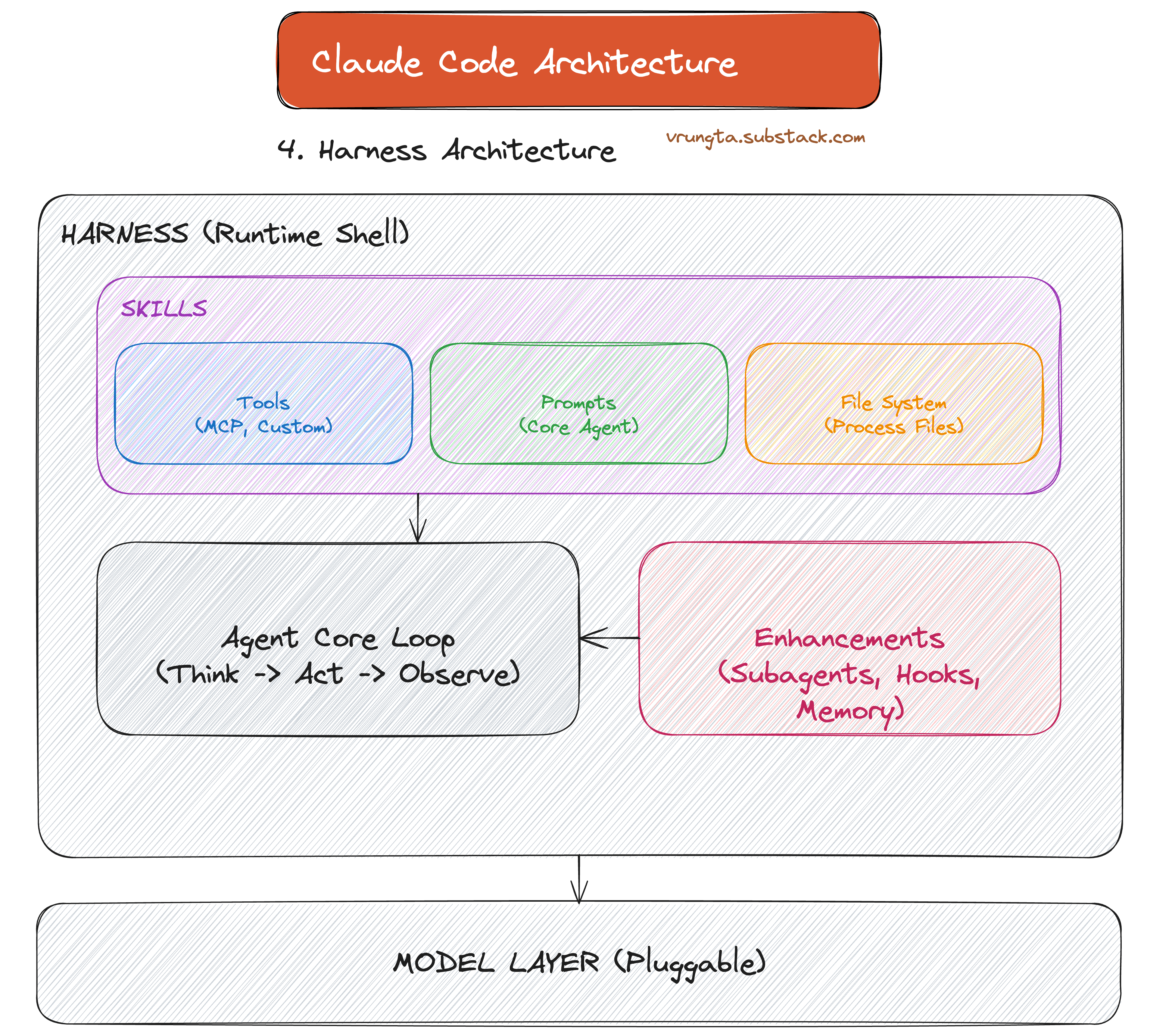
The Harness is the Body: The AI isn’t just a prompt—it’s wrapped in a local Harness that gives the “Brain” (LLM) a “Body” (Shell, Filesystem, Memory) to act in the real world.
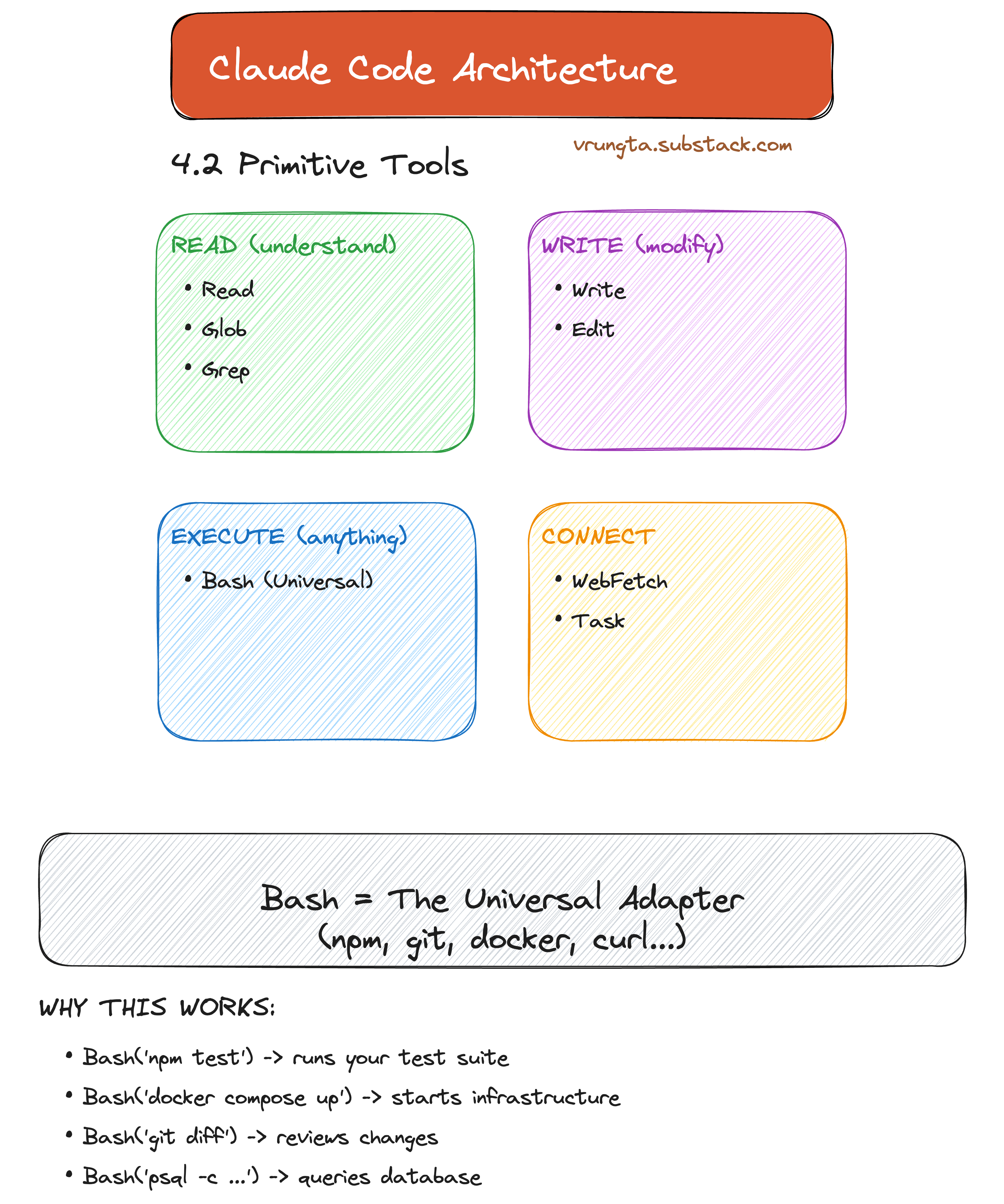
Primitives > Integrations: Instead of 100 brittle “Jira Plugins,” the agent uses Primitive Tools (Bash, Grep, Edit) to compose any workflow a human engineer can execute.
Context Economy: The architecture treats the context window as a scarce resource, protecting it with auto-compaction, sub-agents, and semantic search to prevent “Context Collapse.”
Solving Universal Failures: Runaway loops, amnesia, and permission roulette aren’t bugs—they are structural constraints. This design turns them into managed features.
Co-Evolution: The harness is designed to shrink. As models get smarter, hard-coded scaffolding (like planning steps) is deleted, making the architecture thinner over time.
Background
I got curious and reverse engineered a deep dive into the design pillars, primitive tools, and failure-proofing strategies that drive Anthropic’s CLI agent.
Claude Code is Anthropic’s autonomous CLI agent — a terminal-native tool that integrates directly with your local shell, filesystem, and dev environment. It ships with a small set of capability primitives — not 80 specialized tools, not 800. And yet it consistently outperforms agents with hundreds of bespoke integrations.
This guide uses Claude Code as a case study to explain why most AI agents fail — and what architectural decisions you can steal for your own products.
If you prefer a .MD file (and much more detailed) go to https://github.com/vkr11/ChainOfThought/blob/main/claude_code_architecture.md (or include this in your prompt to build this).
I plan to release a future “SuperAgent” architecture that build on these learnings - watch for that.
Warning really long read…..
Methodology: How I Know
This architecture was reverse-engineered from runtime transcripts, filesystem artifacts (~/.claude), behavioral stress-testing, Anthropic’s public documentation and presentations, and my own experience building agentic systems.
Disclaimer: This is an external analysis. The actual internal architecture may differ — I welcome corrections.
Part 1: The Problem — Why Most AI Agents Fail
Before looking at Claude Code’s architecture, it’s worth understanding why it exists. These failure modes plague every agentic system: customer support bots, research assistants, and internal copilots.
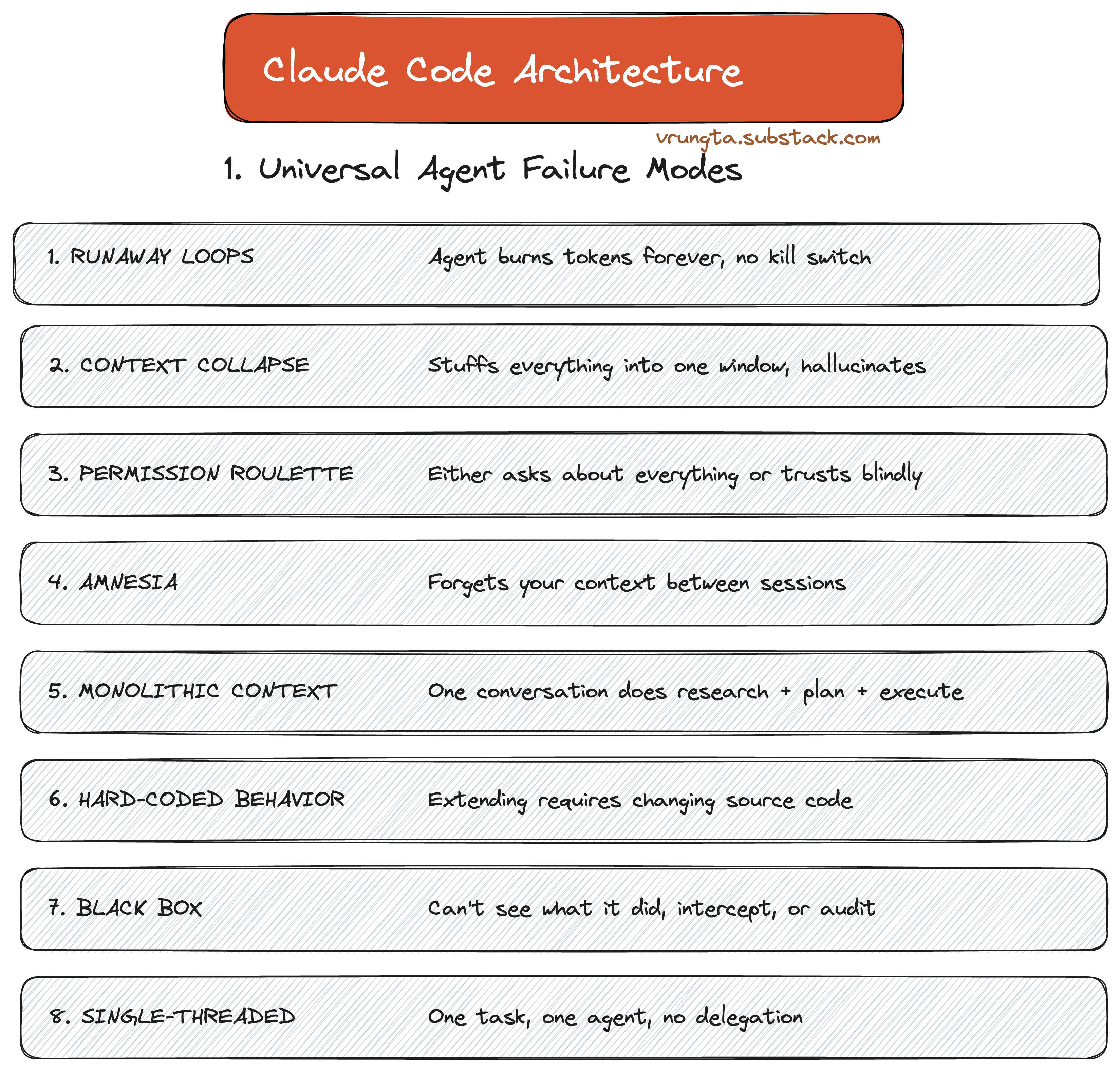
From ‘Runaway Loops’ where agents burn cash without value, to ‘Context Collapse’ where memory degradation leads to hallucinations—these aren’t just bugs; they are structural bottlenecks that every AI team will eventually hit.
Part 2: The Approach — Five Design Pillars
Claude Code answers these failure modes with five core design pillars. Every feature in the product maps back to at least one of these.
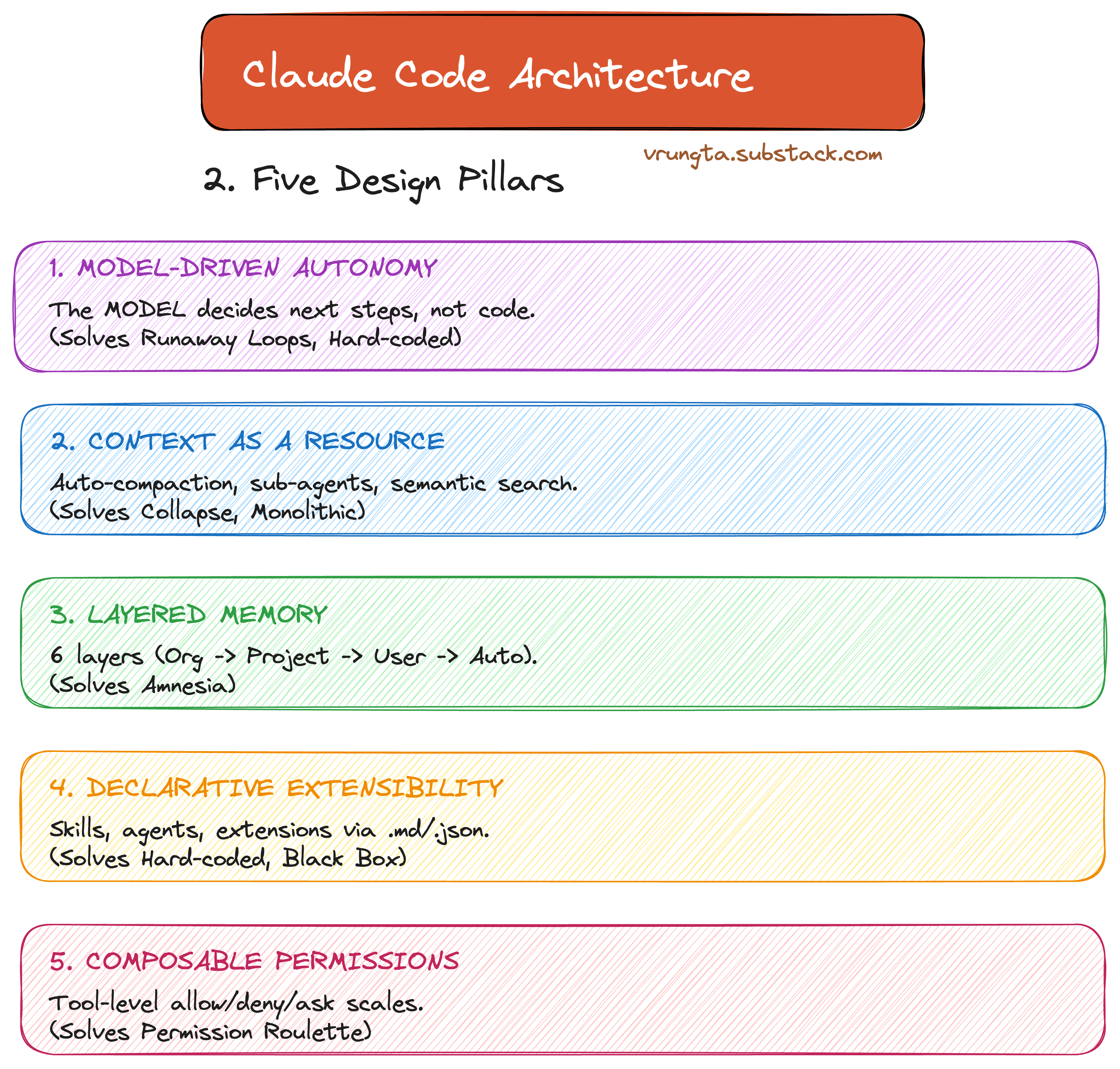
Model-Driven Autonomy: The model decides next steps, not a hard-coded script.
Context as a Resource: Auto-compaction and semantic search protect the scarcest resource: the context window.
Layered Memory: 6 layers of memory load at session start so the agent never starts from zero.
Declarative Extensibility: Skills, agents, and hooks via .md and .json—not code.
Composable Permissions: Tool-level allow/deny/ask scales from “ask everything” to “bypass all.”
Part 3: The Evolution — From API Calls to Agents
Claude Code represents the third stage of LLM maturity: moving from rigid code-driven workflows to autonomous model-driven loops.
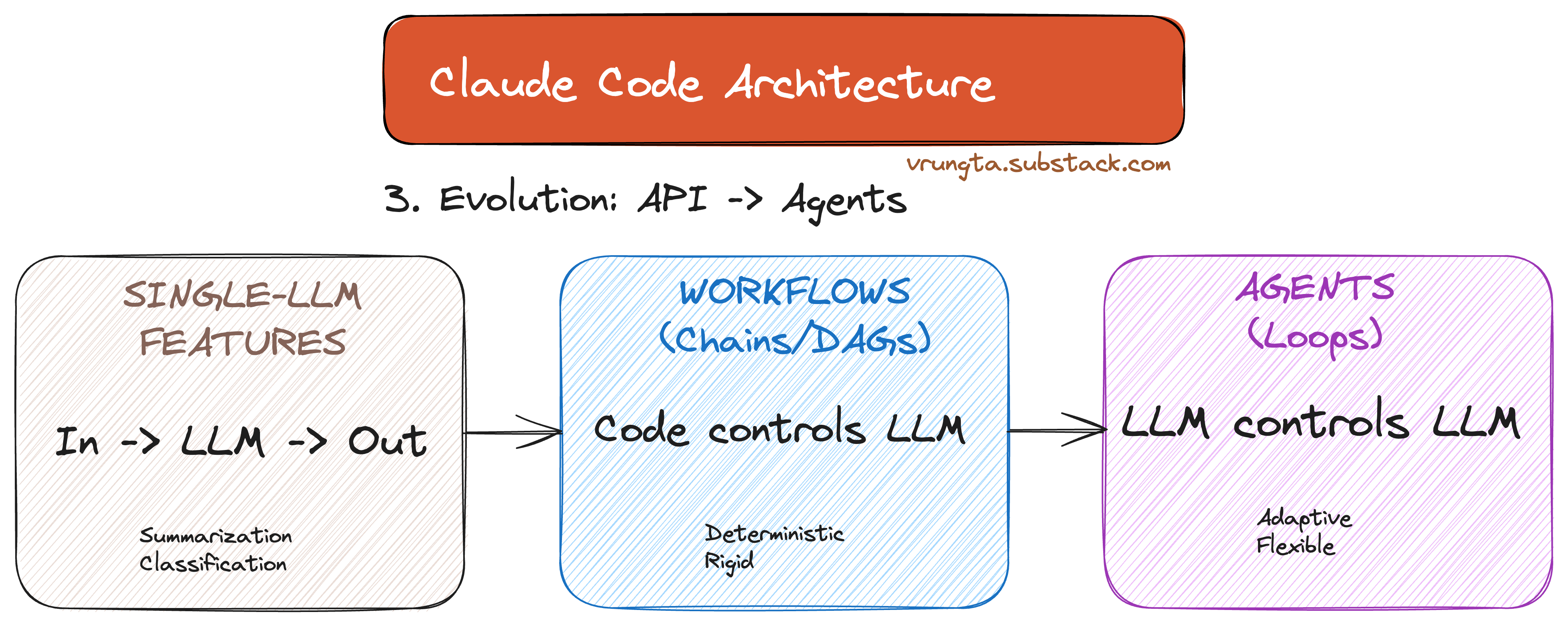
In traditional workflows, code decides what the LLM does next. In agents, the model decides. This is the fundamental architectural choice—the runtime is a “dumb loop,” and all intelligence lives in the model.
Part 4: The Architecture — Inside the Harness
Claude Code is a Harness—a local runtime shell that wraps an LLM with tools, memory, and orchestration.
4.1 The Agentic Loop (TAOR)
The heart of the system is the TAOR loop: Think-Act-Observe-Repeat. The orchestrator doesn’t know about code or files; it just runs the loop and lets the model decide when to stop.
4.2 Primitive Tools: The Power of Simplicity
Claude Code uses Capability Primitives: Read, Write, Execute, and Connect. Bash acts as the universal adapter, allowing the model to use any tool a human developer would (git, npm, docker).
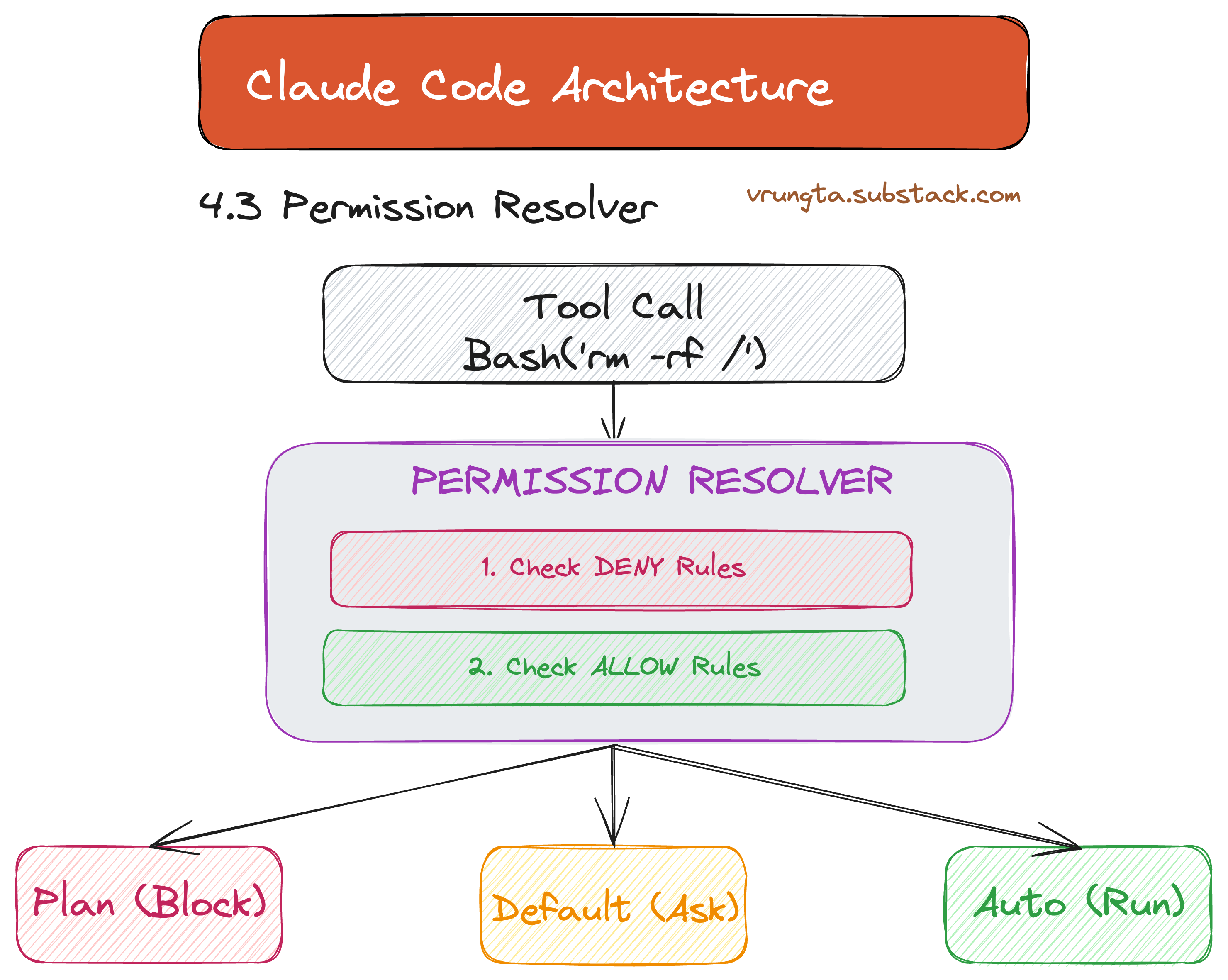
4.3 Permissions: Trust at Scale
The static analysis layer checks every tool call against a multi-tiered whitelist. This resolver is what makes it safe to give an AI a shell.
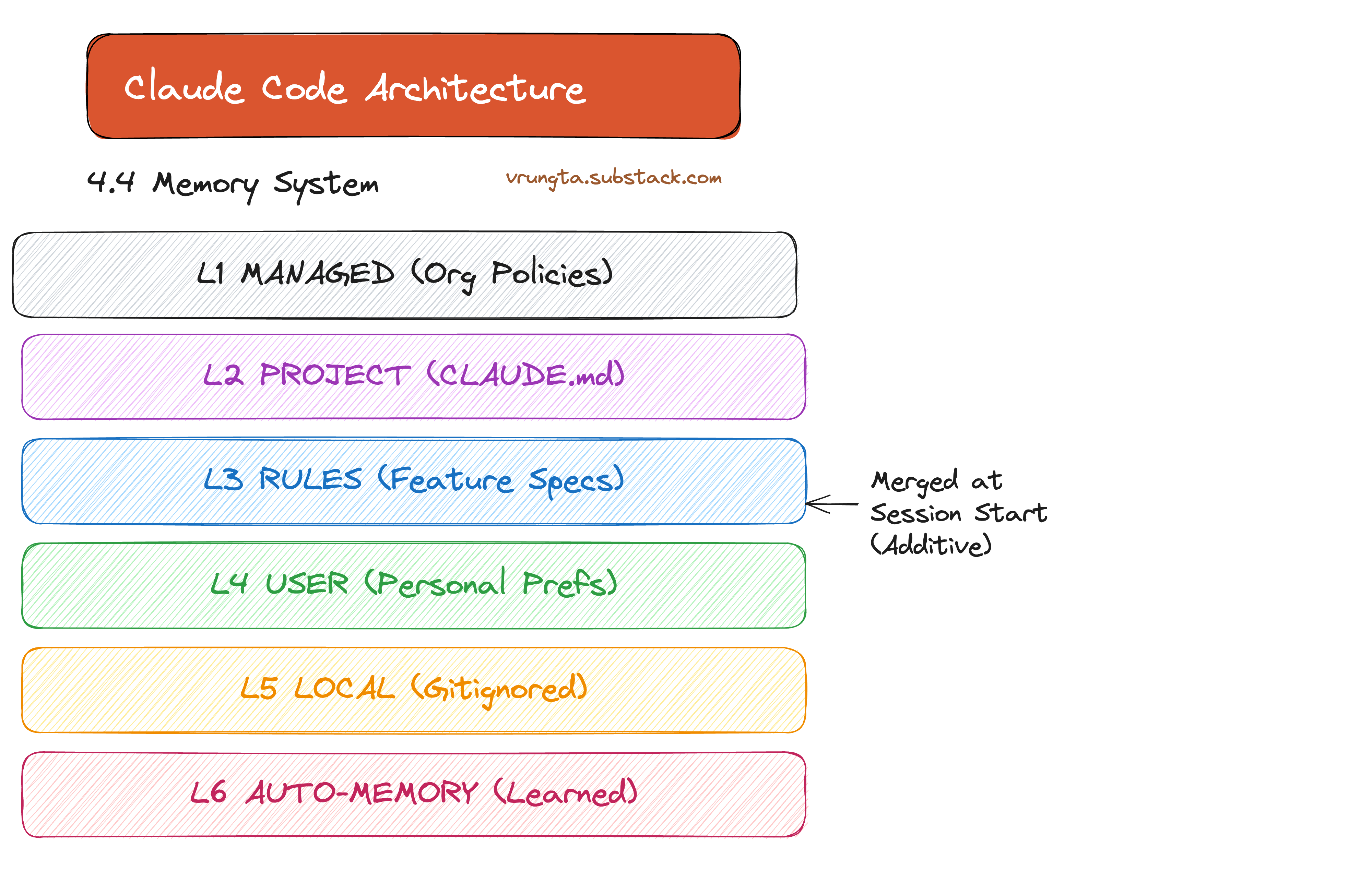
4.4 Layered Memory: Never Start from Zero
At session start, the agent loads everything from organization policies to personal preferences. The Auto-Memory loop even allows the agent to learn your patterns and write them to MEMORY.md for future sessions.
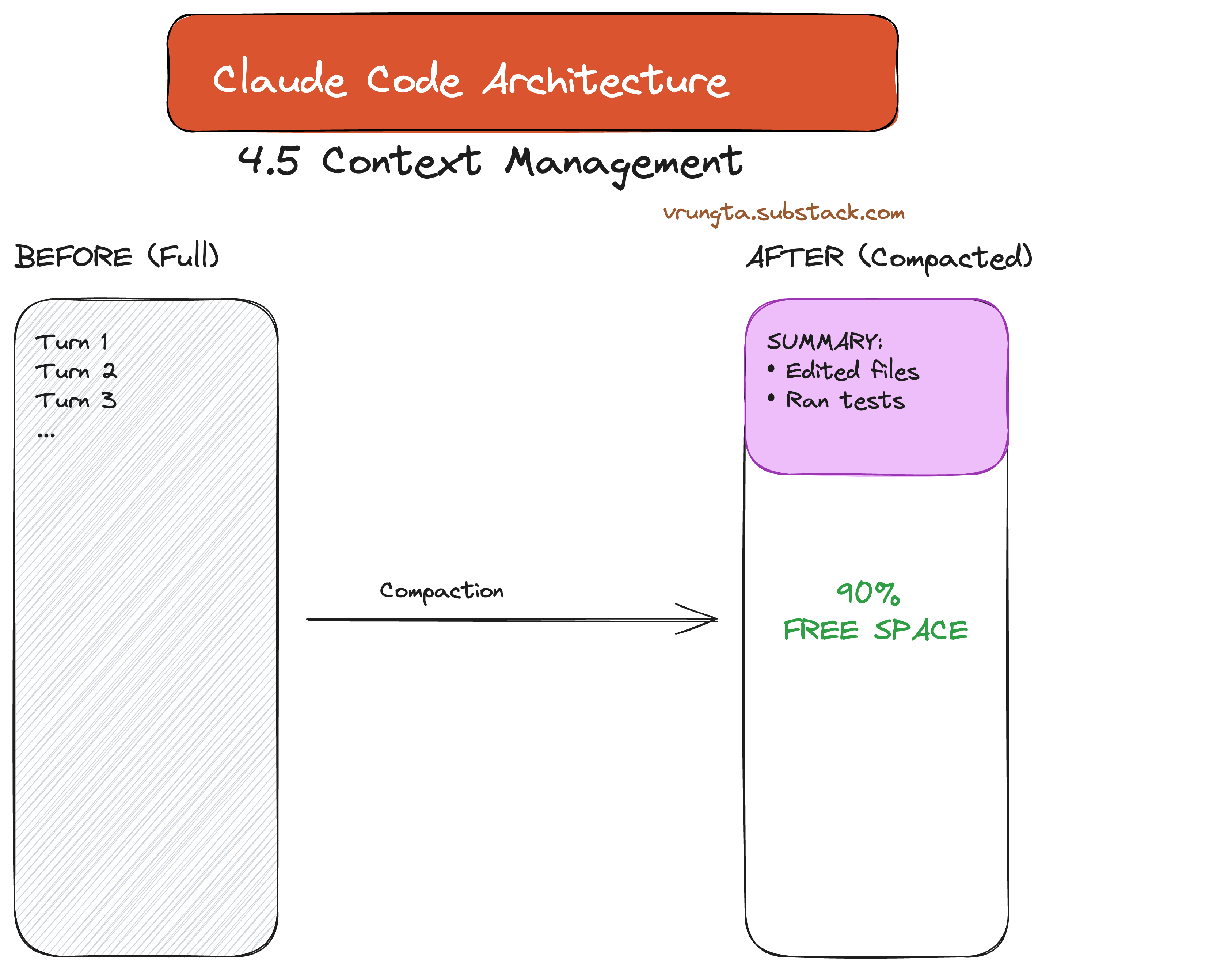
4.5 Context Window Management
To prevent “Context Collapse,” the system automatically compacts the transcript as it approaches the limit, replacing raw turns with summaries to free up space while preserving decisions.
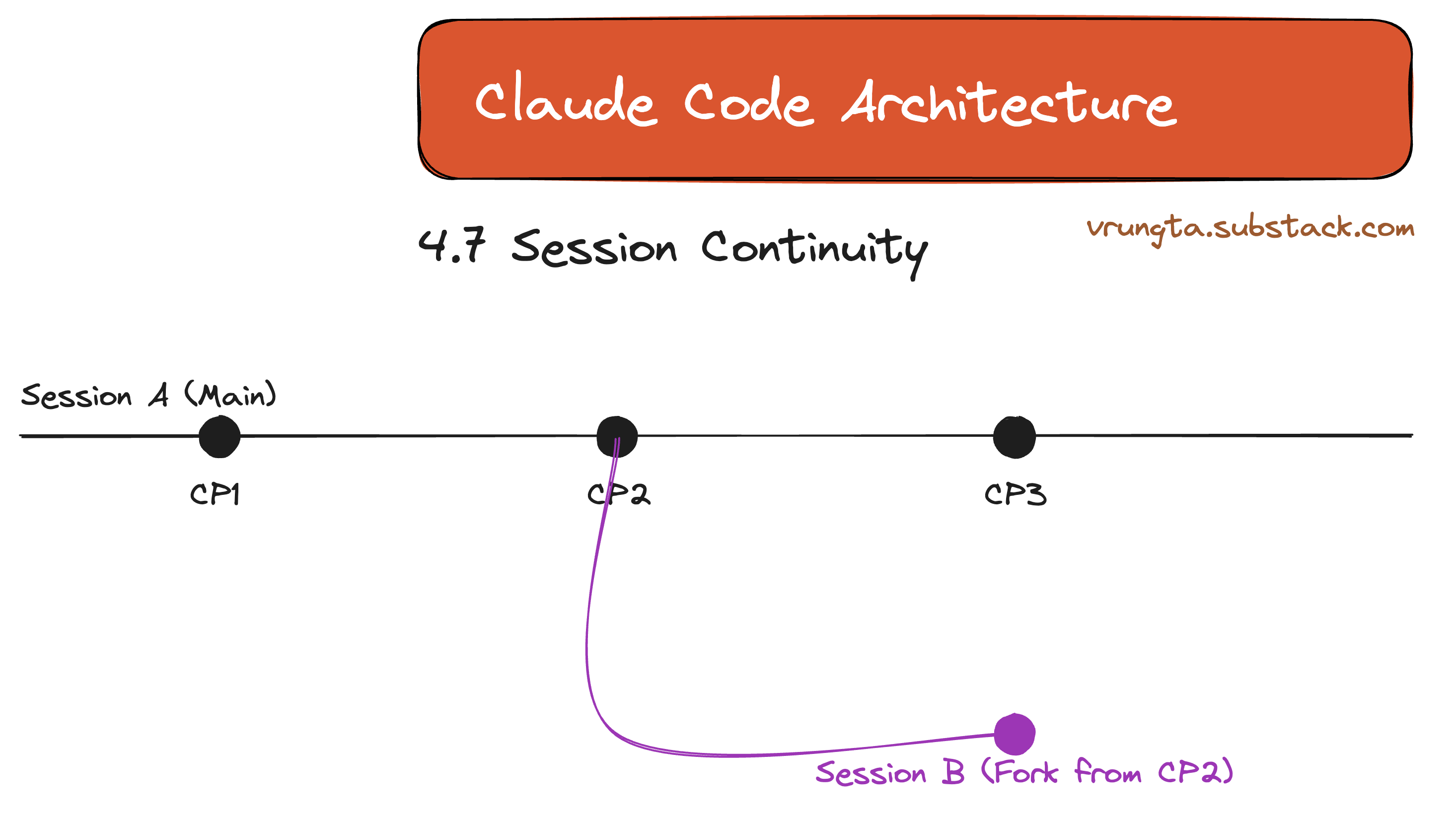
4.7 Session Continuity
Sessions aren’t disposable. They function like git branches, allowing you to checkpoint, rollback, or fork exploration into a new path.
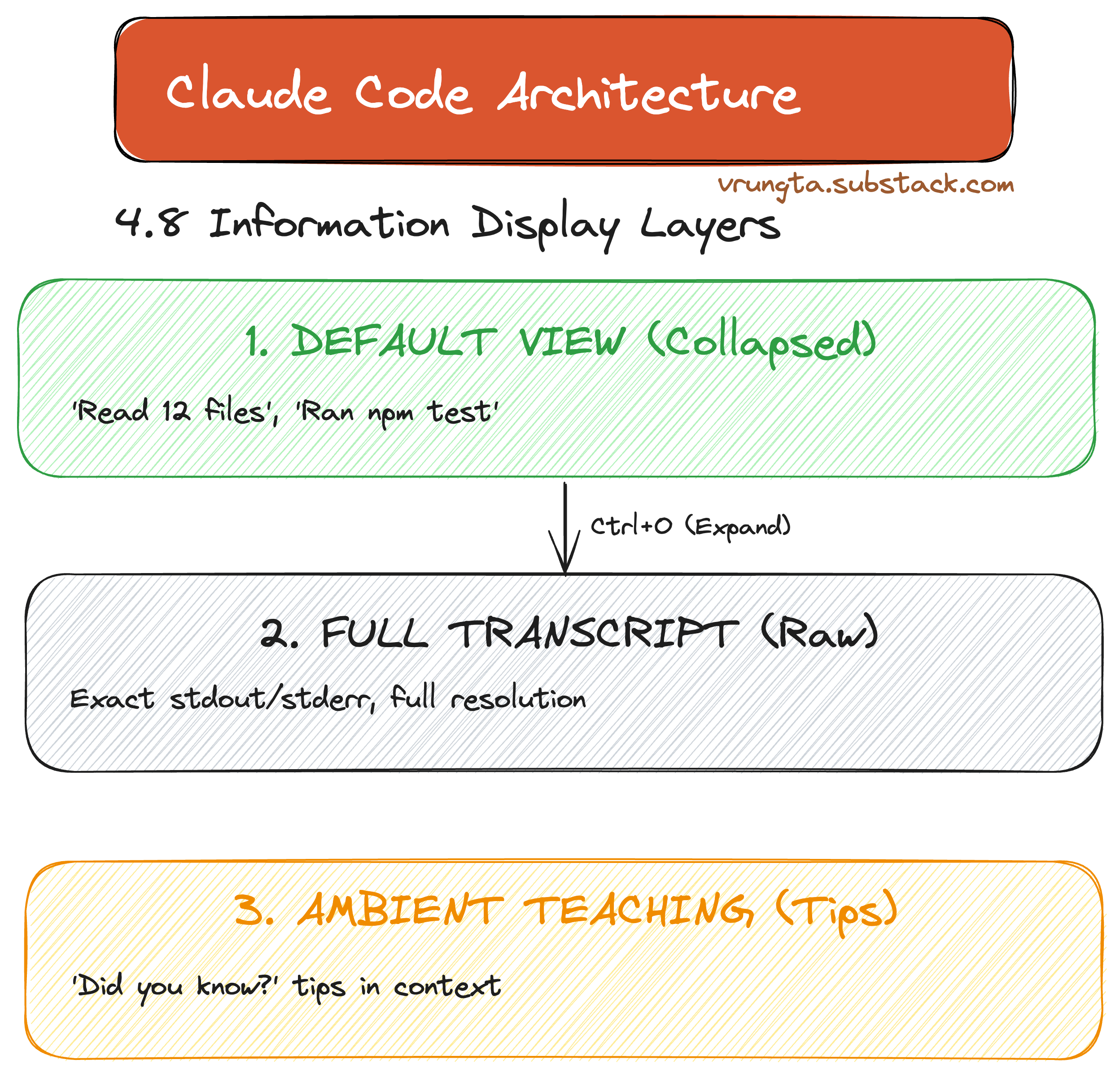
4.8 UX Layer: “Collapsed but Available”
The UX follows a three-layer model: minimizing noise by default but never hiding information. What the user sees, the model also sees—ensuring perfect alignment.
Part 5: The Declarative Extension Model
Claude Code is a platform where anyone can add capabilities without writing a line of TypeScript or Python.
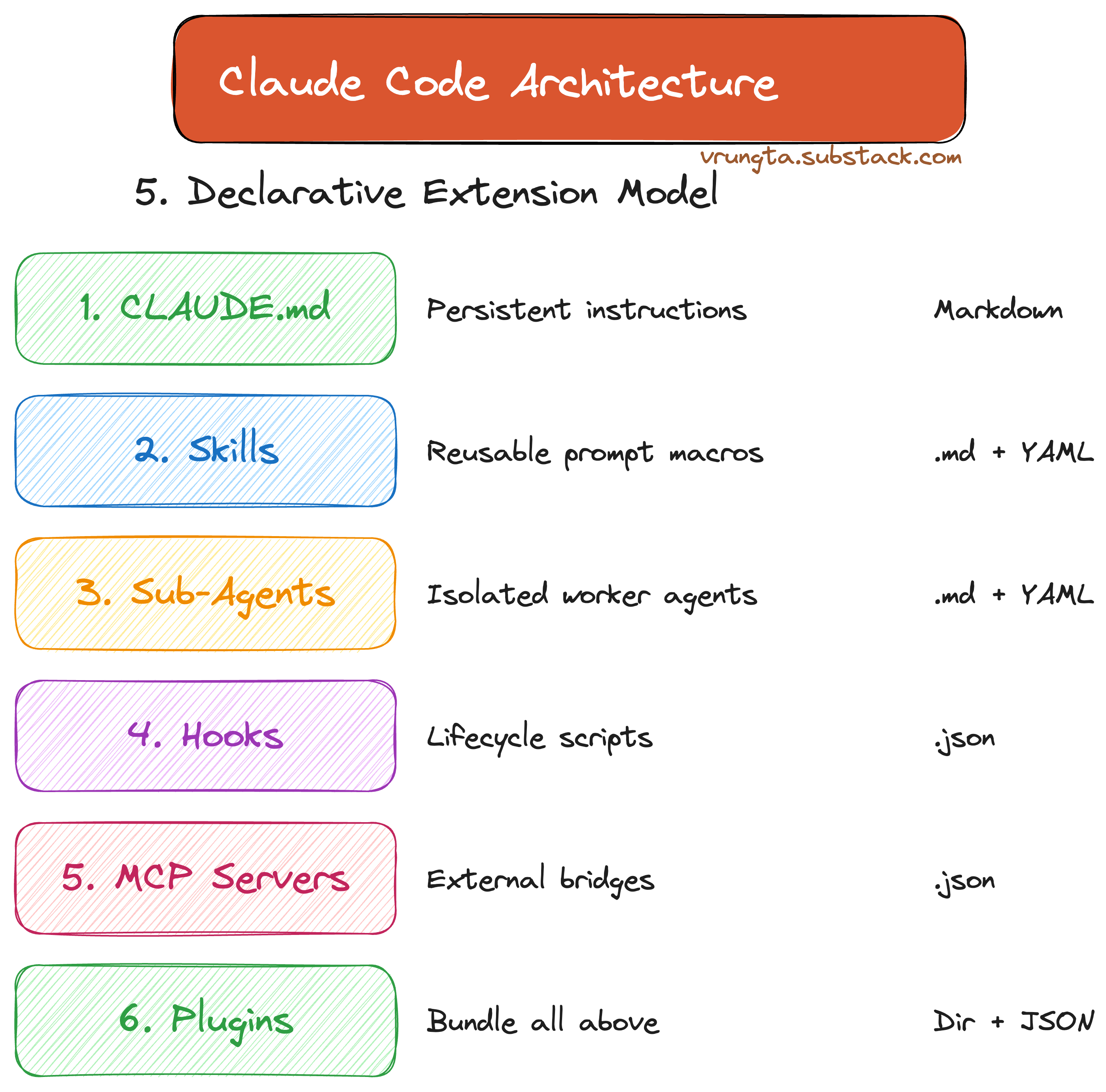
From simple CLAUDE.md instructions to full Agent Teams, the extension model is declarative, making it accessible to non-engineers and providing a “demand-sensing” mechanism for future features.
Deep Dives: Technical Reference
Sub-Agents: Isolated Workers
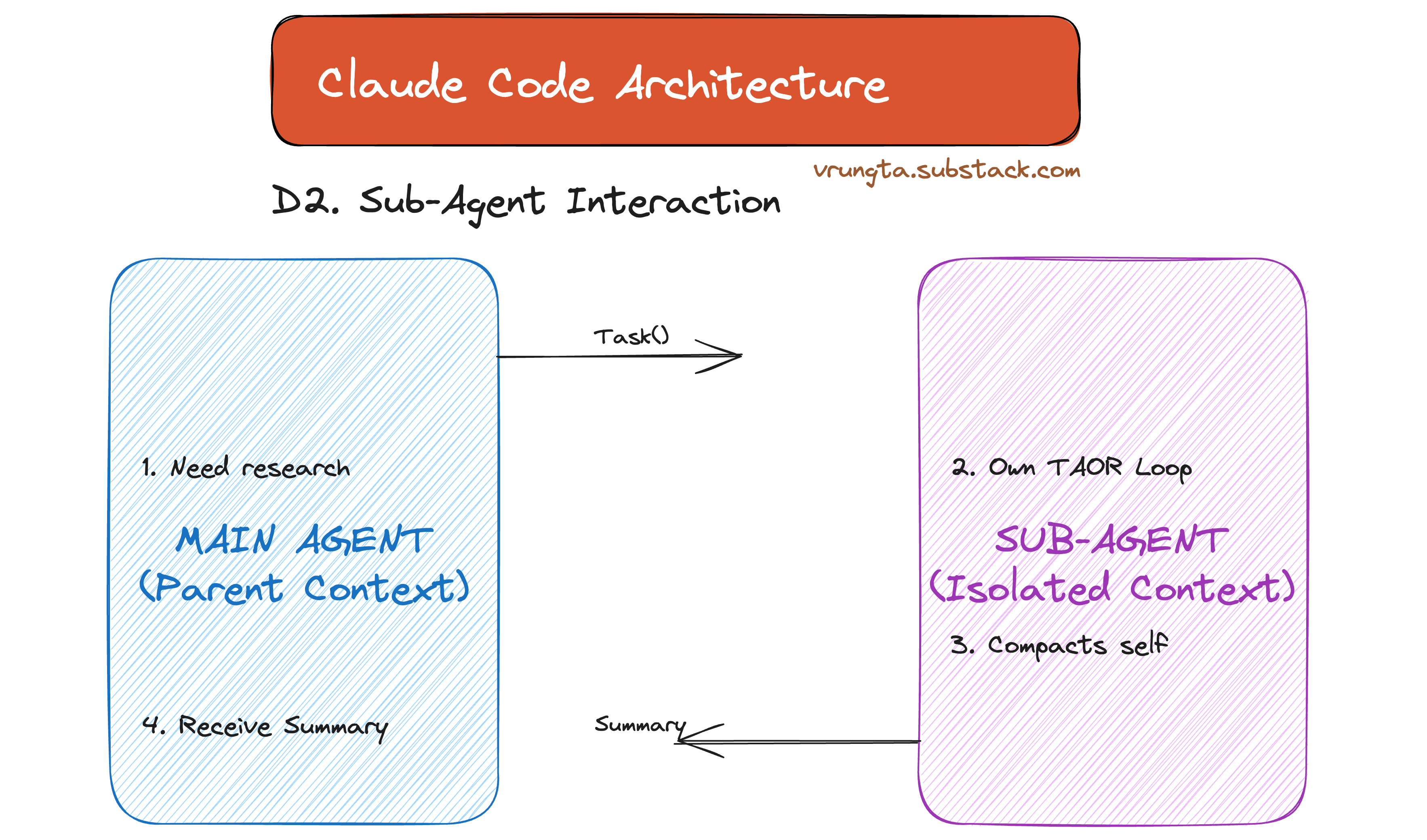
Sub-agents provide context isolation, offloading heavy research tasks without polluting the main window.
Agent Teams (Experimental)
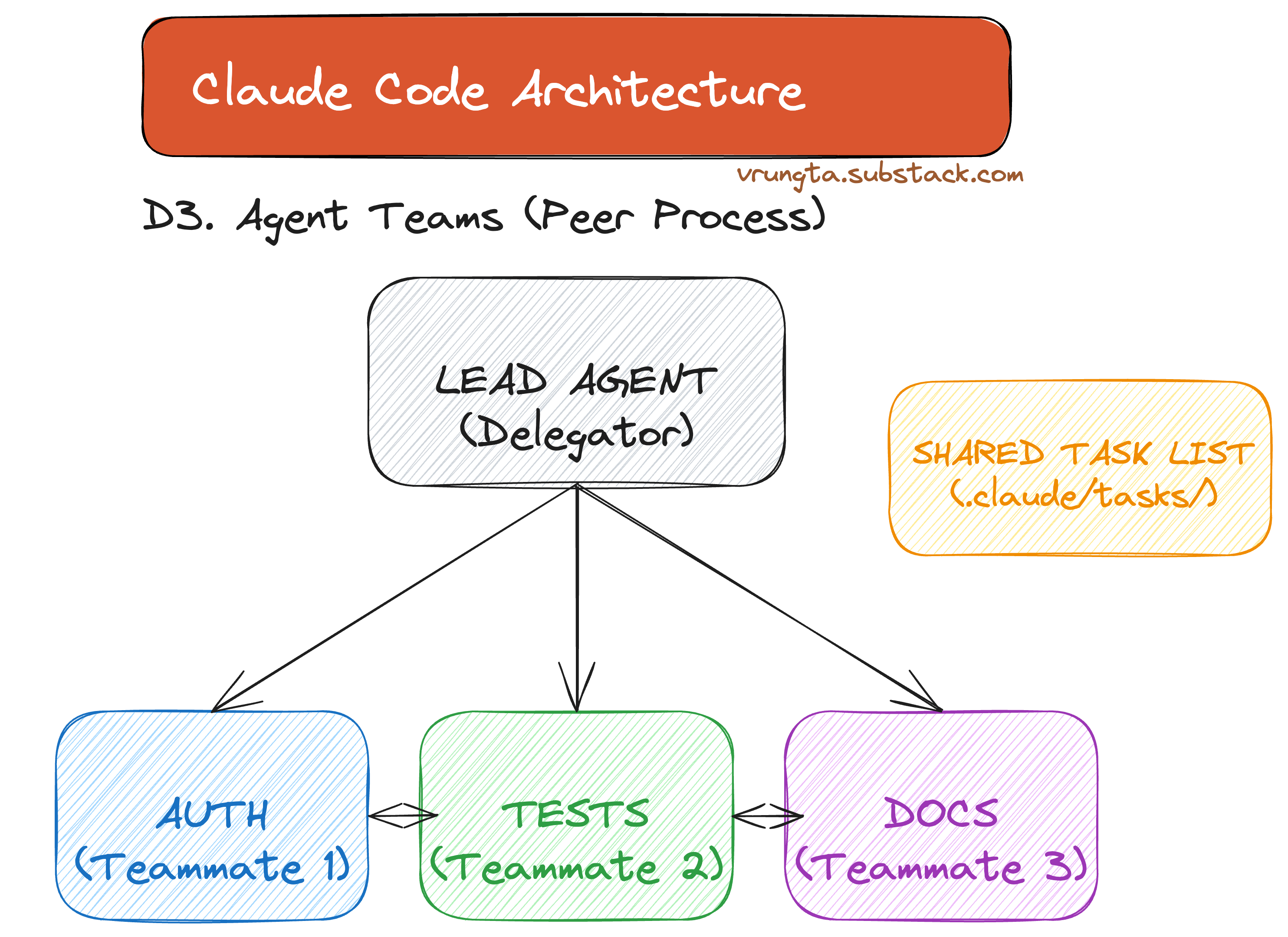
Peer processes that coordinate via a shared task list for parallel implementation across modules.
Hook Lifecycle
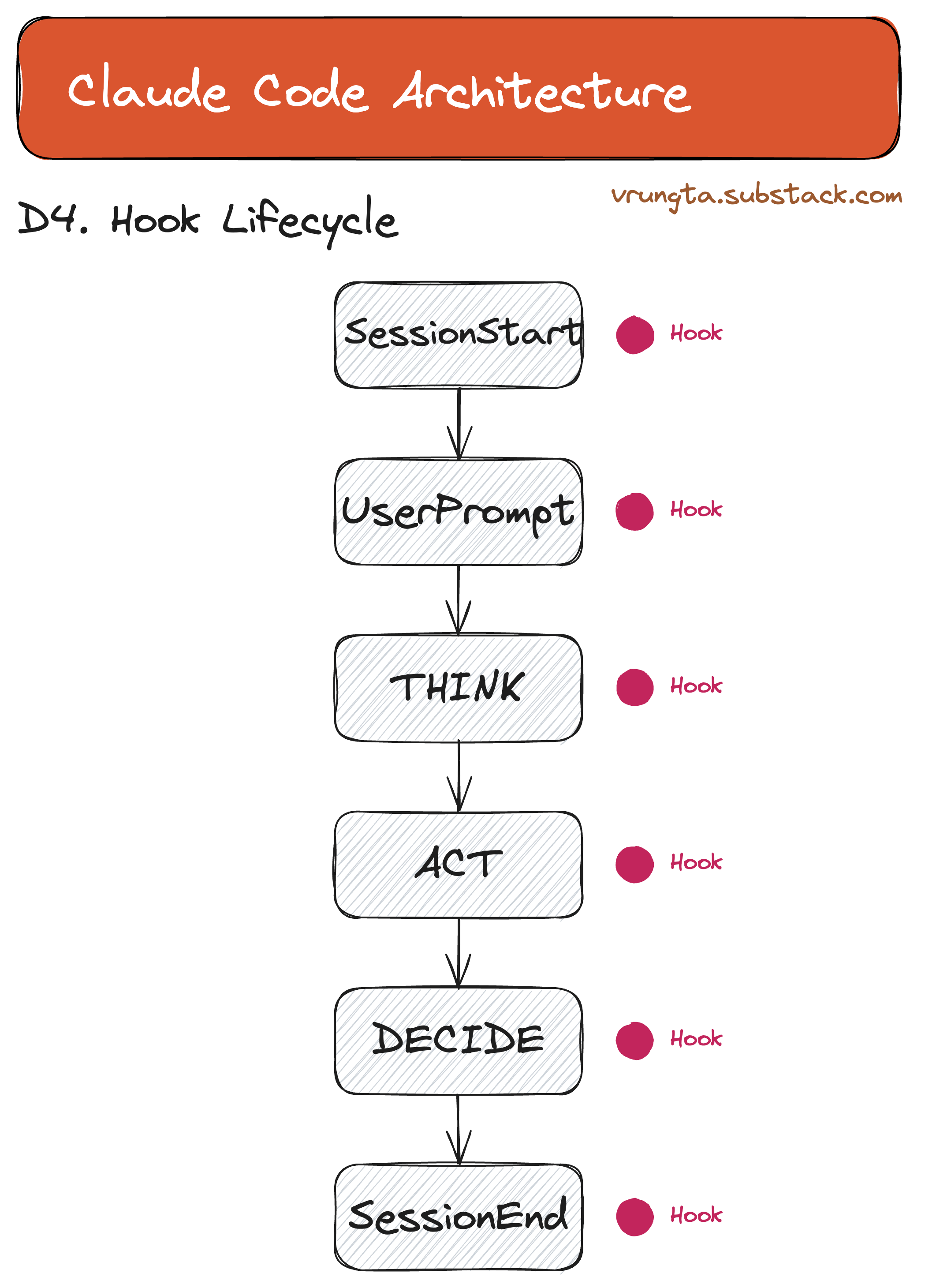
Deterministic scripts that fire at every lifecycle event—lint on save, audit on shell, gate on deploy.
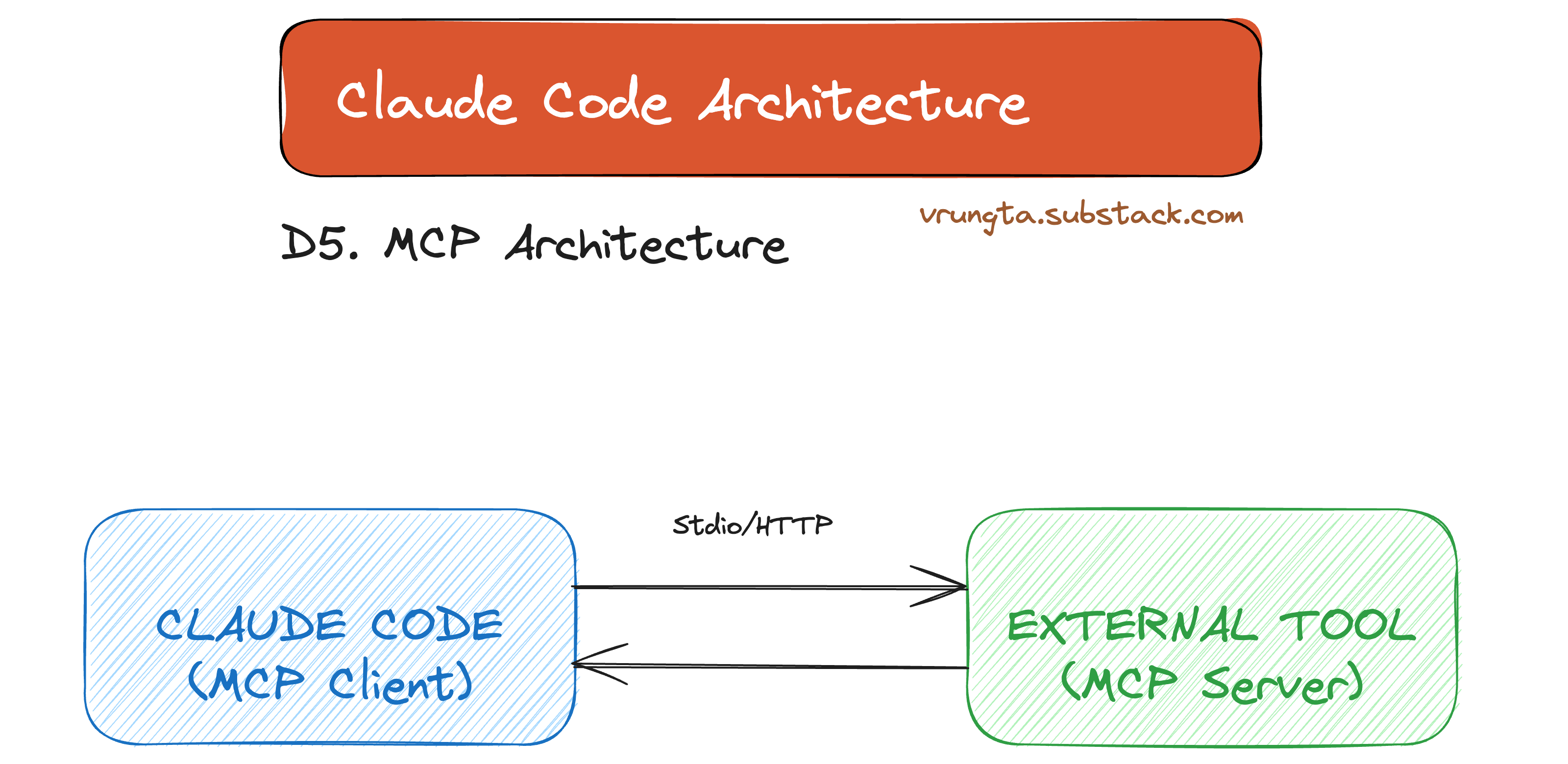
MCP Architecture
The Model Context Protocol (MCP) provides a universal bridge to external services and tools.
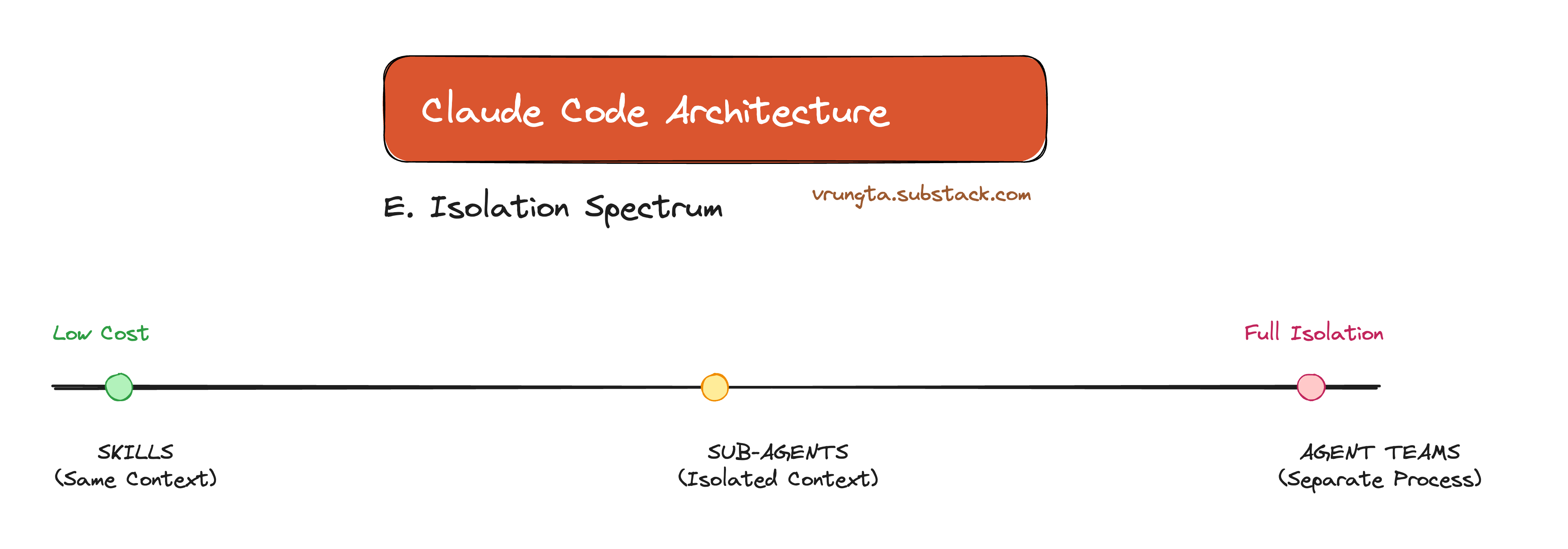
The Isolation Spectrum
From Skills (same context) to Agent Teams (separate processes), the architecture offers a spectrum of trade-offs between cost and isolation.
Part 6: What You Should Steal
Regardless of whether you use Claude Code, build a competitor, or design agentic features in your own product — these patterns transfer.
If You’re Building an Agent
PatternWhy It WorksTAOR loop + primitive tools~50 lines of loop logic + a shell gives you infinite surface area. Don’t build 100 tools.Sub-agents for isolationDon’t force one context to do research AND implementation. Solves #2 (Context Collapse) and #5 (Monolithic Context).Todo tool for task trackingPrevents context rot. The model manages its own scratchpad — not a rigid planner.Context file (CLAUDE.md)Inject project-specific ground truth on every turn. Performance goes from frustrating to magical.Layered memoryDon’t make the user re-explain. Load org → project → user → auto-learned context at startup.Hooks for determinismLint on save, audit on shell, gate on deploy — without the LLM. Deterministic where you need guarantees.
If You’re Evaluating AI Agents
Use the 8 failure modes as a scorecard:
Failure ModeQuestion to AskRunaway loopsDoes the tool have a turn limit? Can I kill a stuck session?Context collapseDoes it manage context window size? How?Permission rouletteCan I whitelist safe commands and block dangerous ones?AmnesiaDoes it remember my project across sessions?Monolithic contextCan it delegate subtasks to isolated contexts?Hard-coded behaviorCan I extend it without writing code?Black boxCan I intercept, audit, or hook into its actions?Single-threadedCan it run parallel tasks?
If You’re a PM Designing AI Features
InsightWhat It Means For Your ProductPermissions are UXThe trust spectrum (read-only → ask → auto → bypass) is how you ship AI to enterprises. Without it, you’re stuck in demo mode.Memory is a product featureUsers expect agents that learn. Auto-memory isn’t over-engineering — it’s table stakes for retention.“Delete code on model upgrade”As models get smarter, your scaffolding should shrink. If your product gets more complex with each model release, your architecture is wrong.
Part 7: Key Takeaways
For Product Managers
InsightWhy It MattersThe model is the brain, the harness is the bodyYou can swap the brain (model) without rebuilding the body (tools, memory, permissions). Plan for model-agnosticism.Generic beats specificA small set of capability primitives outperforms 100 specialized tools. Invest in composability, not coverage.Memory is a product featureUsers expect agents that remember. A 6-layer memory system is not over-engineering — it’s table stakes.Permissions are UXThe trust spectrum (plan → default → dontAsk → bypass) is what makes the difference between “toy” and “production-ready.”Extensibility is adoptionDeclarative config (.md files, not code) means non-engineers can extend the system. This dramatically expands your user base.
For Engineers
InsightWhy It MattersBuild a dumb loop, not a smart orchestratorThe TAOR loop has ~50 lines of logic. All intelligence is in the model + prompt. This is dramatically easier to maintain and debug.Bash is your most powerful toolDon’t build tool wrappers for npm test or git commit. Give the model a shell and let it compose.Context is your hardest constraintEvery architectural decision — sub-agents, compaction, forked contexts, tool search — exists to manage a single 200K-token budget. Design for it from day one.Think in layers, not monolithsMemory (6 layers), permissions (tool + specifier + scope), extensions (skill → agent → team) — the pattern is always layered composition.Hooks are underratedDeterministic scripts at lifecycle events give you linting, auditing, security gates, and telemetry — without touching the LLM.Delete code when models improveIf you’re adding scaffolding with every release, you’re fighting the model. The harness should get thinner over time.
Closing the Loop: All 8 Solved
Remember the 8 universal failure modes from Part 1? Here’s where each one gets killed:
#Failure ModeWhat Solves ItSection1Runaway LoopsmaxTurns cap + model-driven stop signal (not hard-coded exit)§4.1 TAOR Loop2Context CollapseAuto-compaction at ~50% + sub-agents with isolated context windows§4.5 + D23Permission Roulette6 permission modes + tool-level allow/deny/ask with glob patterns§4.3 Permissions4Amnesia6-layer memory system loads at session start; auto-memory persists learned patterns§4.4 Memory5Monolithic ContextSub-agents fork isolated TAOR loops; Agent Teams run parallel peersD2 + D36Hard-Coded BehaviorDeclarative extensions (Skills, Agents, Hooks, MCP, Plugins) — no code changes needed§Part 57Black BoxHooks fire at every lifecycle event; deterministic scripts for audit, lint, and gatesD4 Hooks8Single-ThreadedSub-agents (child delegation) + Agent Teams (parallel peers)D2 + D3
Every architectural choice in this guide exists to solve one or more of these problems. If you’re building your own agent — in any domain — use this table as your checklist.
The Architecture in One Sentence
A model-agnostic harness that gives any tool-calling LLM filesystem access, a shell, layered memory, and declarative extensibility — all within a bounded autonomous loop governed by composable permissions.
Deep Dive: Technical Reference
The sections below provide granular detail on each extension mechanism. If the main article gave you the “what” and “why,” this section gives you the “how.”
D1. Skills — Prompt Macros
Skills are reusable instruction bundles that inject context or trigger workflows via /slash-commands.
  my-skill/
  ├── SKILL.md            # Instructions (required)
  ├── reference.md        # Extra docs
  ├── examples/           # Example outputs
  └── scripts/            # Executable scripts

  Invoke:   /deploy                    (slash command)
            /review my-file.ts         (with arguments)
            Auto-triggered by Claude   (reads description field)
Key FieldPurposedisable-model-invocation: truePure context injection, zero LLM costcontext: forkRun in isolated context (doesn’t pollute main)allowed-toolsRestrict available tools during execution
D2. Sub-Agents — Isolated Workers
Sub-agents run their own TAOR loop in a separate context window and return a summary. They are the primary mechanism for context isolation — offloading heavy research, testing, or exploration without polluting the main conversation.
Built-in Sub-Agents
Claude Code ships with three built-in sub-agents, each optimized for a different job:
Built-in AgentModelToolsUse CaseExploreHaiku (fast)Read-only (Read, Grep, Glob)File discovery, codebase explorationPlanInheritedRead-only (Read, Grep, Glob)Codebase research for planningGeneral-purposeInheritedAll toolsComplex research, multi-step operations
How Sub-Agents Work
The diagram below demonstrates Context Isolation: The main agent delegates a task (e.g., “explore”) to a Sub-Agent. The Sub-Agent runs its own isolated TAOR loop, consumes tokens, and returns only a summary to the parent—protecting the main context window from pollution.
  MAIN AGENT                          SUB-AGENT (isolated)
  ┌────────────────┐                  ┌──────────────────────┐
  │                │   Task(explore)  │                      │
  │  "I need to    │────────────────▶│  Own TAOR loop        │
  │   explore the  │                 │  Scoped tools         │
  │   codebase"    │                 │  Own maxTurns         │
  │                │                 │  Own compaction       │
  │                │                 │  Own MEMORY.md        │
  │                │   summary only  │                      │
  │  "Found 3      │◀────────────────│  20 turns of work     │
  │   files..."    │                 │  (stays inside)       │
  └────────────────┘                  └──────────────────────┘
  Context cost:                       Full context used,
  just the summary                    then discarded
Foreground vs Background Execution
Foreground: Blocks the main conversation. Permission prompts and questions pass through to the user.
Background: Runs concurrently while the user keeps working. Permissions are collected upfront before launch, then auto-denied if not pre-approved. Background agents can’t ask clarifying questions — the tool call simply fails and the agent continues. MCP tools are unavailable in background mode.
Press Ctrl+B to send a running foreground agent to the background.
Custom Sub-Agents (YAML Frontmatter)
Custom sub-agents are defined as .md files with YAML frontmatter:
---
name: code-reviewer
description: Expert code reviewer. Use proactively after code changes.
tools: Read, Glob, Grep, Bash
disallowedTools: Write, Edit
model: sonnet            # or opus, haiku, inherit
permissionMode: default  # or acceptEdits, dontAsk, plan, delegate, bypassPermissions
maxTurns: 25
skills:
  - api-conventions
  - error-handling-patterns
memory: user             # or project, local
---

You are a senior code reviewer. When invoked:
1. Run git diff to see recent changes
2. Focus on modified files
3. Provide feedback by priority: Critical → Warnings → Suggestions
Storage scopes: ~/.claude/agents/ (user-level), .claude/agents/ (project-level), or via --agents CLI flag.
Key Capabilities
FeatureHow It WorksPersistent MemorySet memory: user → agent writes learned patterns to ~/.claude/agent-memory/<name>/MEMORY.md. First 200 lines auto-loaded on next invocation.Skill PreloadingSet skills: [api-conventions] → injects skill instructions into the sub-agent’s context before it starts.Tool Scopingtools whitelist AND disallowedTools blacklist. One sub-agent can restrict another: tools: Task(worker, researcher).Chaining“Use code-reviewer to find issues, then use optimizer to fix them.” — sequential delegation.ResumabilityTranscripts persist in ~/.claude/projects/{project}/{session}/subagents/. Ask Claude to “continue that code review” and it resumes with full prior context.Auto-CompactionSub-agents compact independently as they approach context limits. Main conversation compaction does not affect sub-agent transcripts.
D3. Agent Teams — Multi-Session Parallelism
Agent Teams are entirely separate Claude Code instances coordinating via a shared filesystem. Unlike sub-agents (which are child processes), teammates are peer processes that can communicate bidirectionally.
Status: Agent Teams are currently experimental. Enable via
CLAUDE_CODE_EXPERIMENTAL_AGENT_TEAMS=1in environment orsettings.json.
When to Use Agent Teams (vs Sub-Agents)
DimensionSub-AgentsAgent TeamsProcess modelChild of main agentIndependent peer processesCommunicationSummary returned at endOngoing message/broadcast IPCContextIsolated, discardedIndependent, persistentCoordinationSequential delegationShared task list, self-claimingBest forResearch, exploration, reviewsParallel implementation across modules
Architecture
Unlike Sub-Agents, Agent Teams run as parallel peer processes. As visualized below, a Lead Agent assigns work via a Shared Task List, while independent agents (Auth, Tests, Docs) execute simultaneously in separate terminal panes, coordinating via message passing.
  ┌─────────────────────────────────────────────────────────────────┐
  │                        LEAD AGENT                                │
  │                     (Delegate Mode)                              │
  │                                                                 │
  │   "Implement auth, tests, and docs"                             │
  │        │              │              │                           │
  │        ▼              ▼              ▼                           │
  │   ┌─────────┐   ┌─────────┐   ┌─────────┐                      │
  │   │  Auth   │   │  Tests  │   │  Docs   │  ◀── Shared Task List │
  │   └────┬────┘   └────┬────┘   └────┬────┘  ~/.claude/tasks/     │
  └────────┼──────────────┼──────────────┼──────────────────────────┘
           │              │              │
     ┌─────┴─────┐  ┌─────┴─────┐  ┌────┴──────┐
     │  tmux #1  │  │  tmux #2  │  │  tmux #3  │
     │  Claude   │◀─┤  Claude   │◀─┤  Claude   │ ◀── Peer messaging
     │  Instance │─▶│  Instance │─▶│  Instance │
     │  Own ctx  │  │  Own ctx  │  │  Own ctx  │ ◀── Independent
     └───────────┘  └───────────┘  └───────────┘
Configuration: ~/.claude/teams/{team-name}/config.json
Display Modes
ModeHow It WorksRequirementsIn-processAll teammates inside your terminal. Shift+Up/Down to select, type to message.Any terminalSplit panesEach teammate gets its own pane for full visibility. Click into a pane to interact.tmux or iTerm2
Set via settings.json: { "teammateMode": "in-process" } or claude --teammate-mode in-process.
Coordination Mechanisms
Shared Task List: All agents see task status. Teammates self-claim the next unassigned, unblocked task when they finish one.
Message: Send a message to one specific teammate.
Broadcast: Send to all teammates simultaneously (use sparingly — cost scales with team size).
Automatic Idle Notification: When a teammate finishes and stops, it automatically notifies the lead.
Plan Approval: You can require teammates to get plan approval before making changes: “Spawn an architect teammate. Require plan approval before they make any changes.”
Quality Gate Hooks
Two team-specific hooks enforce quality without involving the LLM:
HookTriggerUse CaseTeammateIdleTeammate about to go idleExit code 2 → send feedback, keep them workingTaskCompletedTask being marked completeExit code 2 → prevent completion, request fixes
Entropy Management: For long-running projects, “Garbage Collection” agents are a powerful architectural pattern enabled by Team Agents. You can configure a low-cost background teammate to scan for architectural drift (e.g., deprecated patterns, TODOs, stale docs) and open refactoring PRs automatically. This prevents the “AI Slop” accumulation that plagues purely generative workflows.
Use Cases
Parallel feature implementation: Auth, tests, and docs each owned by a different teammate.
Research with competing hypotheses: Three teammates test different theories and converge on an answer.
Cross-layer coordination: Frontend, backend, and infrastructure changes in parallel.
Parallel code review: Multiple reviewers examine different aspects simultaneously.
D4. Hooks — Deterministic Lifecycle Events
Hooks are scripts that run outside the LLM loop — zero AI, pure determinism. They’re the observability and guardrail layer.
  ┌──────────────────────────────────────────────────────────────────┐
  │                       HOOK INJECTION POINTS                       │
  │                                                                  │
  │   ○ SessionStart ─────────────────────────────────────────┐      │
  │                                                           ▼      │
  │   User message ──▶ ○ UserPromptSubmit (can transform)     │      │
  │                               │                           │      │
  │                          ┌────┴────┐                      │      │
  │                          │  THINK  │                      │      │
  │                          └────┬────┘                      │      │
  │               ○ PreToolUse ◀──┘  (can block/modify)       │      │
  │               ○ PermissionRequest (can auto-approve/deny) │      │
  │                          ┌────┴────┐                      │      │
  │                          │   ACT   │                      │      │
  │                          └────┬────┘                      │      │
  │              ○ PostToolUse ◀──┤                            │      │
  │              ○ PostToolUseFailure ◀──┘                     │      │
  │               ○ PreCompact (can inject context)            │      │
  │                          ┌────┴────┐                      │      │
  │                          │ DECIDE  │── tool_use ──▶ loop   │      │
  │                          └────┬────┘                      │      │
  │                          ○ Stop                           │      │
  │                          ○ SessionEnd ◀───────────────────┘      │
  └──────────────────────────────────────────────────────────────────┘

  Example: Auto-lint after every file write
  ┌──────────────────────────────────────────┐
  │  "PostToolUse": [{                       │
  │    "matcher": { "tool_name": "Write" },  │
  │    "command": "eslint --fix $FILE"       │
  │  }]                                      │
  └──────────────────────────────────────────┘
The diagram above maps the execution flow of hooks. Note closely where they act—PreToolUse can block an action before it happens (security), while PostToolUse can react to it (observability). The SessionStart and SessionEnd hooks allow for environment setup and teardown.
Pro Tip: Linter-Driven Remediation. Don’t just fail a build. Write custom linters that output remediation instructions directly into the agent’s context. Instead of “Error: Line 14,” the output should be “Error: Line 14 uses a deprecated API. Replace
foo()withbar().” This turns the linter into a teacher.
D5. MCP — The Universal Service Connector
MCP (Model Context Protocol) lets the agent talk to any external service — databases, APIs, SaaS tools — through a standard protocol.
  ┌──────────────────────────────────────────────────────────────────┐
  │                          CLAUDE CODE                              │
...
  │   100+ tools?  ──▶  Semantic Tool Search  ──▶  Only inject relevant defs
  └──────────────────────────────────────────────────────────────────┘
MCP abstracts away the proprietary APIs of your tools. As shown, it supports three transport modes depending on where the tool lives:
Stdio: For local tools (databases, CLI apps).
HTTP: For remote servers (SaaS integrations).
SSE: For streaming updates (logs, real-time feeds).
Killer Use Case: Runtime Inspection. One of the most powerful MCP applications is a “Chrome DevTools MCP” or “LogQL MCP.” This gives the agent eyes — allowing it to inspect the DOM of a running localhost server, grab console errors, or query structured logs. Without this, the agent is coding blind. With it, the agent can validate its own fixes.
D6. Plugins — Bundle Everything
Plugins package skills, agents, hooks, and MCP servers into distributable, installable units.
  my-plugin/
  ├── plugin.json         # Metadata, version, dependencies
  ├── skills/             # /my-plugin:deploy, /my-plugin:review
  ├── agents/             # Custom sub-agents
  ├── hooks/              # Lifecycle scripts
  └── mcp-servers/        # Service connectors
This structure enables the “One-Click DevOps” experience. Instead of asking a developer to configure ESLint, pre-commit hooks, and a database connector separately, you simply ship a standard-compliance plugin that configures all of them instantly.
Marketplaces allow discovering and installing community plugins. Plugin skills are namespaced (my-plugin:deploy) to avoid conflicts.
Appendix
A. Steerability — Engineering Personality
Claude Code’s “tasteful” and “eager” personality is carefully engineered through system prompt structure, not model fine-tuning.
Shouting still works. The most effective way to prevent bad behavior is emphasis in the prompt:
IMPORTANT: DO NOT ADD ***ANY*** COMMENTS unless askedVERY IMPORTANT: You MUST avoid using search commands like find...
Tone & Style is a prompt section. A dedicated markdown section defines the persona:
“If you cannot help, do not explain why — it comes across as preachy.”
“No emojis unless explicitly requested.”
XML tags for structure. The massive system prompt uses XML for semantic parsing:
<system-reminder>— injected at end of turns to reinforce rules<good-example>/<bad-example>— few-shot heuristic training (e.g., “Use absolute paths, don’tcd“)
B. Permission Modes Reference
ModeBehaviorTrust LevelplanRead-only, no writes at all🔒 LowestdefaultAsk before edits and shell🔒 StandardacceptEditsAuto-approve file edits, ask for shell🔓 MediumdontAskAuto-approve everything in allow list🔓 HighbypassPermissionsSkip all checks (managed orgs only)🔓 Maximum
C. Context Strategies Reference
  Strategy              How It Works                         When to Use
  ─────────────────     ──────────────────────────────       ──────────────────────
  Auto-Compaction       LLM summarizes at ~50% usage         Always on (automatic)
  Manual Compact        /compact <focus area>                 User wants targeted trim
  Sub-Agent             Offload to isolated context           Heavy research/exploration
  Forked Context        context: fork in skill                Skill that would pollute ctx
  Logic-Only Skill      disable-model-invocation: true        Pure instruction injection
  MCP Tool Search       Semantic search for relevant tools    Servers with 100+ tools
D. Feature Layering — How Everything Composes
When the same feature is defined at multiple levels, the resolution strategy depends on the feature type:
  CLAUDE.md files         Skills / Subagents         MCP Servers         Hooks
  ────────────────        ──────────────────         ───────────         ─────
  ┌─── Managed ───┐      ┌─── Managed ────┐  WIN   ┌── Local ──┐ WIN  All sources
  ├─── Project ───┤      ├─── CLI Flag ───┤   │    ├── Proj ───┤  │   fire for
  ├─── Rules ─────┤ ALL  ├─── Project ────┤   │    └── User ───┘  │   matching
  ├─── User ──────┤ ADD  ├─── User ───────┤   │                   │   events.
  ├─── Local ─────┤  UP  └─── Plugin ─────┘   ▼    Override by    ▼
  └─── Auto ──────┘                                 name           MERGE
                          Override by name                         (all run)
  LLM resolves            (highest priority
  conflicts               scope wins)
This logic chart is complex but critical. It explains why your CLAUDE.md instructions might conflict with a Plugin.
CLAUDE.md: Everything is added to context (additive).
Skills/Agents/MCP: Name collisions are resolved by priority (Project > User > Plugin).
Hooks: Everyone runs. If a plugin adds a pre-commit hook and you add one too, both execute.
E. The Isolation Spectrum
                        SAME CONTEXT              ISOLATED CONTEXT
                    ┌─────────────────┐      ┌──────────────────────┐
  SAME PROCESS      │                 │      │                      │
                    │     SKILLS      │      │    SUB-AGENTS        │
                    │  (inject here)  │      │  (separate loop)     │
                    │  Zero overhead  │      │  Return summary      │
                    └─────────────────┘      └──────────────────────┘

                                             ┌──────────────────────┐
  SEPARATE PROCESS                           │                      │
  (tmux)                                     │    AGENT TEAMS       │
                                             │  (separate sessions) │
                                             │  Task board + IPC    │
                                             └──────────────────────┘

  Cost:            Low ◀──────────────────────────────────────▶ High
  Isolation:       None ◀─────────────────────────────────────▶ Full
This chart helps you choose the right tool. Need simple instruction macros? Use Skills (cheap, same context). Need to research a topic without filling the window? Use Sub-Agents (isolated context). Need parallel implementation of features? Use Agent Teams (isolated processes).